Meetings, interviews, lectures, brainstorming sessions, appointments, and everyday conversations can generate a surprising amount of information. Taking notes manually can help, but it can also divide attention between listening and writing. Important details may be missed, while handwritten or typed notes can sometimes become difficult to organize afterward.
AI-powered voice recording devices offer another approach. Instead of relying entirely on manual note-taking, a dedicated recorder can capture spoken audio and, when supported by its software and subscription services, process that recording into written information such as transcripts, summaries, key points, or meeting notes.
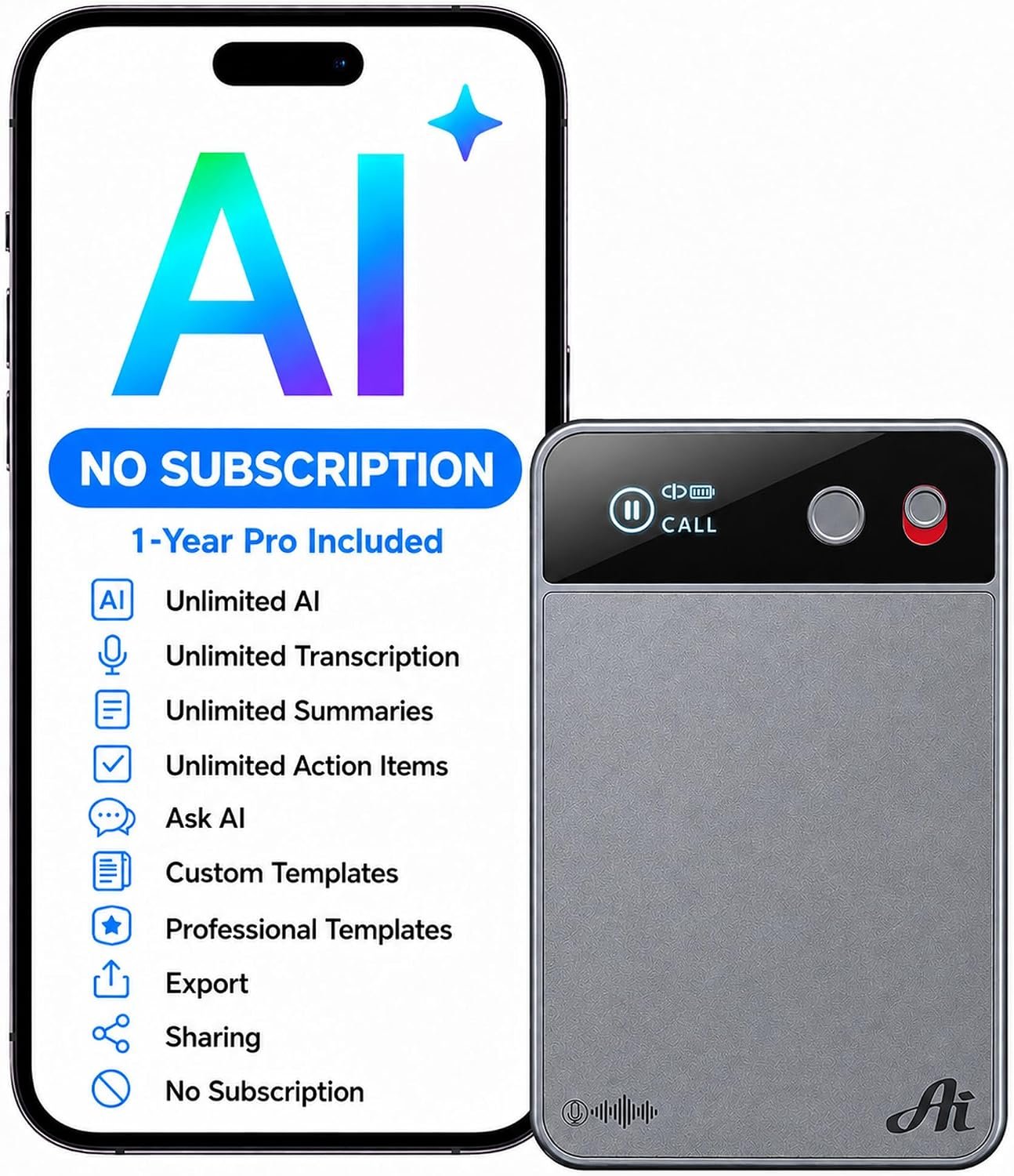
The AI Voice Recorder with 1-Year Pro Included, AI Meeting Notes is designed around this type of workflow. The product listing identifies it as a voice recording device with AI-oriented meeting-note functionality and a one-year Pro subscription included with the product.
The concept is broader than simply recording sound. The goal of an AI voice recorder is to help turn spoken information into something easier to review and organize later.
That can be useful in professional environments, education, interviews, project discussions, personal organization, and many other situations where people need an accurate record of spoken information.
At the same time, AI transcription and summarization should not be treated as infallible. Audio quality, background noise, speaker overlap, accents, terminology, microphone positioning, and software processing can all affect the final result. Important information should therefore be checked against the original recording when accuracy matters.
This guide explains how AI voice recorders work, what features are generally important, how a device in this category can be used, who may benefit from it, and what to consider before incorporating AI-generated meeting notes into a daily workflow.
What Is an AI Voice Recorder?
An AI voice recorder combines traditional audio recording with software-based processing.
A conventional voice recorder primarily performs one task: it captures audio and stores the recording for later playback.
An AI voice recorder can add another layer.
After audio has been captured, compatible software or cloud services can process the recording and potentially generate:
- Written transcripts
- Meeting notes
- Summaries
- Key discussion points
- Action items
- Structured information
- Searchable text
The exact capabilities depend on the device, its companion software, and the subscription or service plan associated with it.
The 1-Year Pro Included designation indicates that the product is associated with a Pro-level service period. Because subscription benefits and service terms can change, users should verify the current listing and activation conditions for the exact features included with the purchase.
The hardware and software should be viewed as parts of the same workflow.
The recorder captures the spoken information, while the AI service processes that information into a more structured format.
Key Features
Voice Recording
At the foundation of the product is voice recording.
Recording spoken conversations provides a reference that can be revisited later.
This can be useful when a discussion contains many details that would be difficult to remember accurately from memory alone.
Instead of trying to write down every sentence, the user can focus more attention on the conversation and use the recording as a reference afterward.
Recording quality depends on factors such as microphone placement, distance from speakers, room acoustics, background noise, and the number of people speaking.
A recorder cannot completely eliminate environmental limitations.
AI Meeting Notes
The central feature suggested by the product name is AI-assisted meeting-note generation.
Rather than requiring the user to manually convert a recording into written notes, compatible AI software can analyze spoken content and produce a structured summary.
Depending on the software’s capabilities, this may include the main topics discussed, important points, decisions, or follow-up tasks.
This can reduce the amount of time spent reviewing long recordings.
However, AI-generated notes should be treated as a convenience rather than an unquestionable source of truth.
If a meeting contains an important deadline, financial figure, technical specification, legal statement, or other consequential information, users should verify the AI output against the original recording.
One-Year Pro Included
The product is described as including one year of Pro service.
A subscription-based model is common for AI transcription services because processing speech and generating summaries can require ongoing software and cloud infrastructure.
The included period can provide access to features that may otherwise require a separate subscription.
Users should review the current activation process and service terms associated with the product, including what happens when the included period expires.
Subscription benefits can vary over time, so the current product documentation should be considered the authoritative source for the exact package.
AI-Powered Transcription
Transcription converts spoken language into written text.
This can be especially useful for meetings because reading a transcript can sometimes be faster than listening to an entire recording.
Searchable text also makes it easier to locate specific topics later, assuming the platform provides appropriate search functionality.
Transcription accuracy is influenced by several factors.
Clear speech recorded with minimal background noise generally gives speech-recognition systems more useful input than distant or overlapping conversations.
Technical vocabulary, uncommon names, acronyms, and strong accents can also present challenges.
Summarization
An AI system can potentially transform a long transcript into a shorter summary.
This is particularly useful when the original recording contains repetitive discussion or lengthy explanations.
A summary can provide a quick overview before the user decides whether a full transcript or recording needs to be reviewed.
However, summarization inherently involves selecting information.
A summary may omit details that were present in the original conversation.
For important meetings, the summary should therefore be considered a starting point rather than a replacement for the source recording.
How It Can Be Used
Business Meetings
Business meetings can involve multiple speakers, changing topics, decisions, deadlines, and follow-up tasks.
An AI voice recorder can help create a record of the conversation and potentially organize the information afterward.
For example, a meeting workflow could involve:
- Starting the recording.
- Participating in the discussion without constantly typing notes.
- Ending the recording after the meeting.
- Processing the audio through the supported AI service.
- Reviewing the generated transcript or summary.
- Confirming important decisions and action items.
- Saving the finalized notes in the appropriate work system.
This workflow can reduce manual note-taking while preserving access to the original audio.
Project Discussions
Project teams often discuss requirements, deadlines, responsibilities, technical decisions, and changes in direction.
These conversations can become difficult to reconstruct later, particularly when several meetings take place over a short period.
An AI-generated transcript can provide a searchable record.
A summary may also help team members quickly review the main topics without listening to the entire recording.
However, the final project record should be maintained in the team’s official project-management or documentation system.
The recorder should support that process rather than replace it.
Interviews
Interviewers can use recording technology to capture conversations for later analysis and documentation.
This can be relevant to journalism, research, business interviews, podcasts, customer interviews, and other professional contexts.
Transcription can make it easier to locate specific comments and organize an interview afterward.
Permission is especially important in interviews.
Participants should understand that the conversation is being recorded and that applicable recording and privacy laws may require consent.
Lectures and Educational Sessions
Students may use voice recording technology to create a reference for lectures or study sessions where recording is permitted.
An AI transcript can make it easier to search through a long lecture and identify specific subjects.
A summary can also serve as a starting point for creating study notes.
However, students should not assume that an automatically generated transcript captures every technical term correctly.
Names, formulas, specialized terminology, and references may need manual verification.
Brainstorming Sessions
Creative discussions can produce many ideas quickly.
Trying to write down everything during brainstorming can interrupt the natural flow of conversation.
Recording the session allows participants to focus on discussion first and organize the ideas later.
AI-generated notes can potentially group major themes and identify recurring concepts.
The original audio remains useful because brainstorming often contains context that may be lost when a system creates a short summary.
Personal Voice Notes
A dedicated voice recorder does not have to be limited to formal meetings.
People can use voice recording for personal reminders, ideas, planning, reflections, or information they want to preserve for later.
The usefulness of AI processing depends on the service’s supported features and the nature of the recording.
For simple reminders, a traditional voice memo may be enough.
For longer spoken thoughts, transcription and summarization can make the information easier to revisit.
Customer or Client Conversations
Professionals who communicate with clients may find recorded notes useful for maintaining accurate records.
However, privacy and consent become especially important in these situations.
Businesses should establish clear policies about when conversations may be recorded, where recordings are stored, who can access them, and how long they should be retained.
AI processing introduces an additional data-handling consideration because the audio or transcript may be processed through an external service.
Who It May Be Suitable For
Professionals Who Attend Frequent Meetings
People who spend much of their workday in meetings may benefit from reducing the amount of manual note-taking required.
An AI-assisted workflow can allow them to concentrate on discussion while creating a reference for later.
Students
Students may use a voice recorder for permitted lectures, study discussions, or personal notes.
The transcription capability can make long recordings easier to search and review.
Researchers and Interviewers
People who conduct interviews or qualitative research can potentially benefit from having both original audio and a searchable written version.
The appropriate consent and data-handling procedures remain essential.
Project Managers
Project managers often need to track decisions, responsibilities, deadlines, and follow-up items.
AI-generated meeting notes can provide an initial structure for organizing these details.
The resulting information should still be checked before being treated as an official project record.
Freelancers and Consultants
Freelancers and consultants may participate in client calls, planning meetings, requirements discussions, and review sessions.
A recording and transcript can provide useful documentation of those conversations when recording is permitted.
People Who Prefer Speaking to Typing
Some people naturally organize their thoughts by speaking.
An AI voice recorder can turn spoken thoughts into text, potentially making it easier to convert ideas into notes, documents, or tasks later.
Important Things to Consider
Recording Consent and Privacy
One of the most important considerations with any voice recorder is consent.
Recording laws vary by location. Some jurisdictions require consent from one participant, while others may require consent from all parties involved.
Workplace policies and organizational rules can also impose additional restrictions.
Before recording another person, users should understand the applicable laws and policies.
The fact that a device technically allows recording does not automatically mean that recording is legally or ethically appropriate.
AI Accuracy
AI transcription is powerful, but it is not perfect.
Potential errors can occur with:
- Background noise
- Multiple people speaking simultaneously
- Quiet speakers
- Strong accents
- Unusual names
- Technical terminology
- Acronyms
- Poor microphone positioning
- Echoing rooms
- Very fast speech
The generated text should therefore be reviewed when accuracy matters.
Summaries Can Omit Important Details
An AI summary is intentionally shorter than the original conversation.
That means information is inevitably condensed.
A summary may miss a minor detail that later becomes important.
For consequential meetings, users should retain the original recording and consult the transcript when necessary.
Data Security
AI meeting tools can involve cloud processing.
Depending on the product’s architecture, recordings or transcripts may be transferred to servers for processing.
Users should review the service’s privacy policy and data-handling practices before recording sensitive conversations.
This is especially important for:
- Business information
- Customer data
- Financial information
- Legal discussions
- Confidential research
- Personal information
- Proprietary technical information
Organizations should also consider their internal data-security requirements.
Subscription Terms
The one-year Pro inclusion is an important part of the product description.
Users should understand what features are included during that period and what happens after it ends.
Questions worth checking include:
- Which AI features require Pro?
- What happens when the included period expires?
- Is a paid subscription required afterward?
- Are recordings still accessible without Pro?
- Are transcription limits different between plans?
- How is the subscription activated?
The current product documentation should be consulted because subscription features and policies can change.
Battery Life
A voice recorder is useful only when it has sufficient power.
Battery performance can depend on recording duration, processing functions, connectivity, and other factors.
People who use the device for long meetings or interviews should establish a charging routine.
For important recording sessions, checking the battery level beforehand is a simple but valuable habit.
Audio Environment
Even sophisticated transcription software cannot recover every word from an extremely poor recording.
Microphone placement matters.
A recorder positioned close to the main speakers will generally capture more useful audio than one placed far away in a large room.
Background noise, air conditioning, traffic, keyboard sounds, and overlapping conversations can all affect transcription quality.
The physical recording environment remains important even when AI processing is involved.
AI Voice Recorder vs. Smartphone Recording
Most smartphones already include voice-recording applications.
For occasional recording, a smartphone may be perfectly adequate.
A dedicated AI voice recorder can provide a different workflow.
A dedicated device can remain focused on recording rather than notifications, calls, messaging, and other smartphone functions.
It may also be easier to place on a conference table without tying up the user’s primary phone.
The advantage depends on the user’s habits.
Someone who records only a few short notes each month may not need a dedicated recorder.
Someone who regularly records meetings and wants integrated AI processing may find a specialized device more relevant.
AI Voice Recorder vs. Traditional Digital Recorder
A traditional digital recorder generally focuses on capturing and storing audio.
Its simplicity can be an advantage.
There are fewer AI-related processing steps, and users can simply listen to the recording later.
An AI recorder adds transcription and summarization capabilities.
This can save time when the user needs written notes rather than audio alone.
The tradeoff is increased dependence on software and potentially subscription-based services.
A traditional recorder can remain useful when long-term simplicity and offline recording are the main priorities.
AI Meeting Notes vs. Manual Note-Taking
Manual notes provide direct human interpretation.
A person can decide which details matter, identify context, and write down information in their own preferred structure.
AI-generated notes can reduce the effort required to capture and organize information.
However, AI does not necessarily understand the importance of every statement in the same way a participant does.
A practical approach can combine the two.
Users can make a few important manual notes during a meeting while allowing the recorder to capture the broader discussion.
Afterward, AI-generated notes can help organize the conversation, while the user’s own notes provide context.
AI Transcription vs. Listening to the Full Recording
Listening to a full recording provides the most direct access to the original conversation.
The downside is time.
A one-hour meeting takes approximately one hour to listen to in real time.
A transcript can make it easier to scan and search the content.
An AI summary can make the first review even faster.
However, each level of compression can remove context.
A useful workflow is therefore:
Recording → Transcript → Summary → Human verification
The original recording remains the most complete source.
Creating Better Meeting Notes with AI
AI-generated notes become more useful when the source recording is clear and the meeting itself is structured.
Before a meeting, participants can establish a simple agenda.
During the discussion, speakers can identify decisions clearly.
For example, saying that a specific task has been assigned to a particular person can make the resulting transcript easier to interpret.
At the end of the meeting, participants can summarize the main decisions verbally.
These habits can improve both human and AI-generated documentation.
The technology does not replace good meeting practices.
Instead, it can work alongside them.
Organizing AI-Generated Information
A transcript can contain a large amount of text.
A summary can make the information easier to manage, but users still need a system for storing the final information.
A practical structure might include:
- Meeting date
- Participants
- Main topics
- Decisions
- Action items
- Deadlines
- Open questions
- Follow-up meeting date
AI can potentially assist with generating some of these categories, depending on the supported software.
The user should still verify that each item is correct before treating it as an official record.
Using AI Notes for Productivity
The most useful role of AI meeting notes may be reducing the amount of administrative work that follows a conversation.
After a meeting, someone often needs to:
- Write a summary
- Identify action items
- Review decisions
- Share notes
- Update project documentation
- Create tasks
- Follow up with participants
AI can potentially accelerate these steps.
However, automation should be paired with review.
A few minutes spent checking a summary can prevent an incorrect task assignment or misunderstood deadline from being carried into the next stage of a project.
Maintaining Good Recording Habits
Users can improve the quality of recordings by developing a few simple habits.
Position the recorder where speakers can be heard clearly.
Avoid placing it next to loud equipment.
Check the battery before important sessions.
Confirm that recording is permitted.
Use a consistent naming or organization system.
Review important transcripts rather than assuming they are perfect.
Keep recordings only as long as necessary when dealing with sensitive information.
These practices can make a voice recorder much more useful over time.
Frequently Asked Questions
What is an AI voice recorder?
An AI voice recorder is a recording device that combines audio capture with software capable of processing recordings into information such as transcripts, summaries, or meeting notes.
What does “1-Year Pro Included” mean?
The product is described as including one year of Pro-level service. The exact features, activation process, limitations, and post-trial subscription terms should be confirmed through the current product documentation.
Can it record meetings?
A voice recorder designed for meeting use can capture spoken conversations when recording is permitted. The quality of the resulting transcript depends heavily on microphone placement and the recording environment.
Can AI meeting notes replace manual notes?
They can reduce the amount of manual note-taking required, but they should not automatically replace human review. Important decisions, deadlines, names, numbers, and responsibilities should be verified.
Is AI transcription always accurate?
No. Transcription systems can make errors, particularly with background noise, overlapping speakers, accents, uncommon terminology, and poor audio quality.
Why keep the original recording?
The original recording provides the most complete reference if a transcript or AI summary contains an error or omits context.
Can it be used for interviews?
A recorder can be useful for interviews when recording is legally and ethically permitted. Participants should understand that the conversation is being recorded.
Can students use an AI recorder for lectures?
It may be useful where recording is permitted by the instructor and institution. Students should also consider privacy and intellectual-property rules.
Does an AI recorder require a subscription?
AI processing services may use subscription plans. This product is described as including one year of Pro service, but users should check the current terms to understand which functions depend on the subscription.
What happens after the one-year Pro period?
The exact post-included-period options depend on the service’s current terms. Users should check whether a paid plan is required for continued AI processing and which existing recordings or features remain accessible.
Can AI-generated meeting notes contain mistakes?
Yes. AI-generated notes can misinterpret speech or omit context. Important information should be verified against the transcript or original recording.
Does the recorder work well in noisy environments?
Performance can vary significantly in noisy environments. Clear microphone placement and reducing background noise can improve the quality of the captured audio and subsequent transcription.
Is a smartphone enough for voice recording?
A smartphone can handle basic recording tasks. A dedicated AI recorder can provide a more focused workflow for people who regularly need recording, transcription, and meeting-note features.
Are AI meeting notes private?
Privacy depends on how the device and associated service process and store recordings and transcripts. Users should review the provider’s current privacy and data-handling policies before recording sensitive information.
Should businesses use AI recorders for confidential meetings?
Businesses should first review their legal, privacy, security, and internal policy requirements. Confidential conversations may require specific consent procedures and restrictions on where recordings can be processed or stored.
Can the device be used for personal voice notes?
Voice recorders can be useful for personal ideas, reminders, reflections, and spoken notes. The usefulness of AI transcription depends on the supported software and service features.
Conclusion
The AI Voice Recorder with 1-Year Pro Included, AI Meeting Notes represents a shift from traditional audio recording toward a more automated approach to capturing and organizing spoken information.
Instead of treating a recording as the final product, an AI-assisted recorder can potentially transform spoken conversations into transcripts, summaries, key points, and structured meeting information. This can be useful for professionals, students, interviewers, project teams, consultants, and anyone who regularly needs to remember detailed conversations.
The included one-year Pro service is an important part of the product’s value proposition because AI processing often depends on software services rather than hardware alone. Users should pay close attention to the current subscription terms, feature limitations, activation requirements, and what happens when the included period ends.
At the same time, AI should remain an assistant rather than the final authority.
Recording quality matters. Background noise, overlapping speakers, accents, technical vocabulary, and microphone placement can affect transcription accuracy. Summaries can also omit details because their purpose is to condense information.
For important meetings, the original recording should remain available when appropriate, while AI-generated notes should be reviewed before they become an official record.
Privacy and consent are equally important. Recording another person is subject to legal and ethical considerations that vary between locations and circumstances. Businesses and professionals should also consider how recordings and transcripts are stored, processed, and shared.
Used responsibly, an AI voice recorder can become a practical part of a modern information-management workflow. It can reduce the pressure to write down every detail during a conversation while creating a searchable reference that can be reviewed afterward.
The most effective approach is not necessarily to eliminate human note-taking altogether. Instead, the technology can handle the repetitive work of recording and organizing spoken information, while the user remains responsible for interpretation, verification, privacy, and final decisions.
Leave a Reply